
HOW IT WORKS
From your inventory to your customer, step by step.
Here is what happens after you say hello.
THE PROCESS
Five steps
-
Talk to us
Send your sales channels and rough volumes. We reply with a quote.
-
Create your portal account
Your client portal is where you see inventory and orders.
-
Send your inventory
Ship it to our Milton warehouse. We receive it into your portal.
-
We prep, pack and ship
Amazon prep, or orders from your own store, packed by hand and shipped.
-
You follow everything
Inventory, shipments and orders stay visible in the portal.
CLIENT PORTAL
Your inventory and orders, in one place
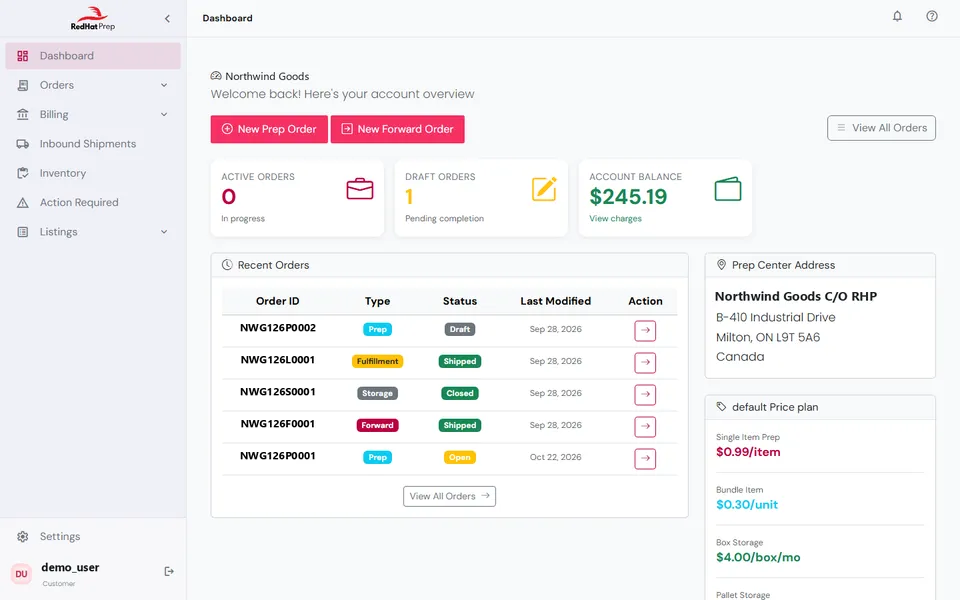
We work with industry-leading warehouse software, so you get a client portal where you can see what you have with us and what is moving.
- Inventory: what is on hand and what is inbound
- Inbound shipments and orders
- Shipping and tracking
INVENTORY
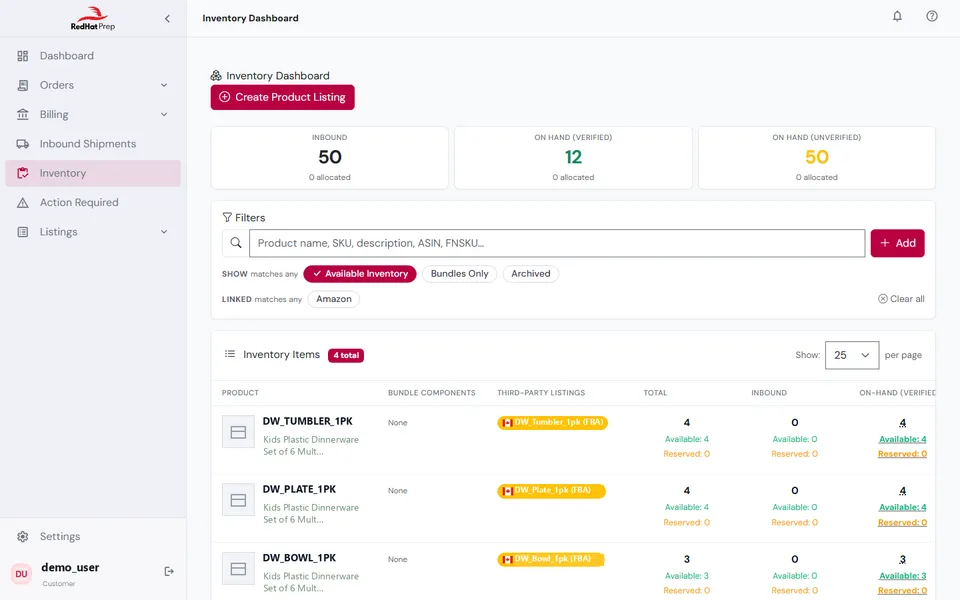
See every product and where it is
Each product shows what is on hand, what is inbound and what is reserved for an order. Every movement is logged, so you can check any number.
FAQ
Frequently asked questions
How do I get started?
Reach us through the contact form, call us at (289) 409-8250, or message us on WhatsApp. We will ask about your products and volumes, then quote.
Do I need a contract?
Ask us when you request a quote. We will put the terms in writing.
Ready to start?
Tell us what you sell. We will reply with a quote.